Why Your React Project Will Never Score 100 on Lighthouse If You Ignore Setup
Why React performance problems often start before feature work begins: bloated entry points, global layouts, bad routing, heavy dependencies, and project structure decisions that quietly damage Lighthouse scores.
2025-09-24
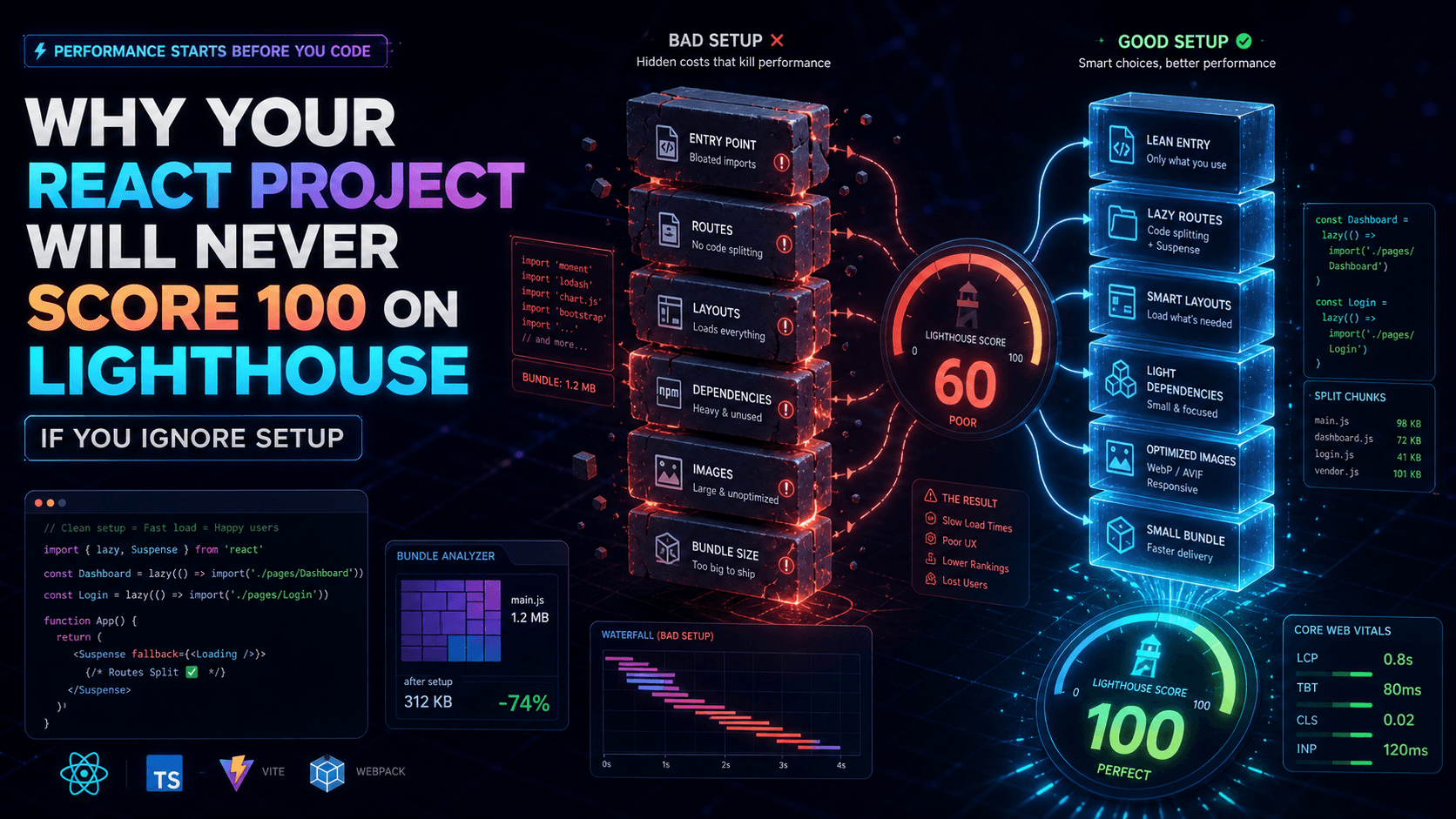
Why Your React Project Will Never Score 100 on Lighthouse If You Ignore Setup
Have you ever joined a React project that already had a "working setup"?
You open the repo, run npm start, and the app works. Great.
Then comes the real test: performance. You run Lighthouse. 90? 80? 60?
You scratch your head:
My code is clean. I used React best practices. Why is this score refusing to climb?
I've been there. Recently, I joined a project that was already initiated. Features existed, routes were in place, and everything seemed okay until I tried to push the app toward top Lighthouse scores.
That's when I realized the biggest bottleneck wasn't my pages. It was the project's foundation.
Let's walk through the issues, laugh a little, cry a little, and then look at how to set up a React project from the first commit in a way that doesn't sabotage performance before you even start.
The issue: bad setup, hidden costs
When you're trying to speed things up, you'll probably start with the obvious work: compressing images, lazy loading content, setting up caching, trimming render work.
Sometimes you dig deeper and realize the real bottleneck is lurking underneath all of that.
Example 1: bloated entry points
The main index.tsx imported half the universe:
import "moment";
import "lodash";
import "chart.js";
import App from "./App";
Even before rendering the first pixel, the browser was forced to download and parse huge libraries that were used only on specific pages.
Lighthouse wasn't impressed. Neither was I.
Example 2: layouts that load everything
The Layout.tsx was like an overprotective parent. It wanted to hold all the app's toys at once.
Modals, dropdowns, carousels, dashboard charts, and several components that did not belong on every page were all loaded globally.
The result?
Your simple login page was already carrying the weight of the entire dashboard.
Example 3: routing done wrong
No lazy routes.
No code splitting.
Every route was loaded like a buffet you didn't even order from.
LCP was destroyed. TBT was dead.
Even if you wrote the cleanest component in the world, Lighthouse kept shouting:
Sorry, your setup is already broken.
The big question
Why do we often skip the initial setup phase?
Maybe we're too excited to start coding features. Maybe we tell ourselves we'll optimize later. Maybe we underestimate how much early decisions affect performance forever.
If you've ever thought, "I'll fix performance at the end," I hate to break it to you, but by then you're fighting uphill.
Before we dive deep into solutions, let's first understand why performance actually matters in frontend work and what led me to write this.
Why performance matters
We all love building features fast. But let me ask you this:
- Have you ever abandoned a website because it took too long to load?
- Have you ever clicked something, but the page felt sluggish or blocked?
That's performance.
Performance is not just about scoring 100 on Lighthouse. It's about:
- User experience: fast apps create happy users. Slow apps create rage quits.
- SEO and ranking: Google uses Core Web Vitals like LCP, CLS, and INP to understand whether your site deserves better visibility.
- Business value: latency affects conversion. On a checkout page, every delay has a cost.
Performance isn't a bonus. It's survival.
The solution: start smart, score high
To avoid this pain, here's what a solid first commit setup should consider.
Folder structure matters more than you think
You might think folder structure is just organization for developers.
In React, it affects performance too:
- Imports and bundling: centralizing everything in
utils/index.tscan accidentally import the whole kitchen sink. - Tree shaking: if files are structured badly, bundlers may fail to eliminate dead code.
- Scalability and lazy loading: grouping pages, components, and assets properly makes code splitting natural.
Bad structure
src/
├── components/
│   └── index.ts
├── utils/
│   └── index.ts
├── App.tsx
└── index.tsx
This looks neat, right?
Wrong.
When you import one small utility, bundlers may include the entire utils/index.ts barrel and everything behind it. That's dead weight in your bundle.
Better structure
src/
├── pages/
│   ├── dashboard/
│   │   ├── Dashboard.tsx
│   │   ├── components/
│   │   └── hooks/
│   └── login/
│       └── Login.tsx
├── shared/
│   ├── components/
│   ├── hooks/
│   └── utils/
├── App.tsx
└── main.tsx
Why this helps:
- Features and pages are isolated, so you import only what you need.
- Shared code remains reusable without being forced globally.
- Bundlers like Vite and Webpack can tree-shake unused code more effectively.
- Lazy loading pages becomes the obvious path.
The "only what you use" dependency strategy
Here's the thing about dependencies that many developers don't think about enough: every npm install is like inviting someone to live in your user's machine forever.
When you install a date library just to format 2024-01-15, you're making users download code they may never need, just so you can avoid writing a tiny native helper.
That's like ordering a whole pizza when you only want one slice, then making the customer pay for the entire pizza and carry it around.
Before you install anything, ask yourself:
Can I write this in 20 to 50 lines of vanilla JavaScript?
In many cases, the answer is yes. Your bundle stays lean, and you understand the code you're shipping instead of hoping a random package works forever.
Dependency decision example: date handling
// Bad: heavy for this use case
import moment from "moment";

const formatted = moment().format("YYYY-MM-DD");
// Better, but still ask whether you need the dependency
import { format } from "date-fns";
const formatted = format(new Date(), "yyyy-MM-dd");// Best for simple date formatting: native
const formatted = new Date().toISOString().split("T")[0];For a small reusable helper:
// utils/date-formatter.ts
export const formatDate = (
  date: string | Date,
  pattern = "yyyy-mm-dd",
): string => {
  const d = new Date(date);
  const year = d.getFullYear();
  const month = String(d.getMonth() + 1).padStart(2, "0");
  const day = String(d.getDate()).padStart(2, "0");

  return pattern
    .replace("yyyy", String(year))
    .replace("mm", month)
    .replace("dd", day);
};
The lesson is simple: ask whether you really need a large library to format a date. Usually, the answer is no.
Before you type npm install, pause and consider:
- Can I implement this feature with 50 lines of code or less?
- Will I use more than 30 percent of this library's features?
- What's the bundle size? Check Bundlephobia.
- Will this affect Time to Interactive?
- Is there a smaller alternative?
- Can I extract only the function I need?
- Is the package actively maintained?
- When was the last release?
- How many open issues does it have?
- Will my team understand this dependency?
Keep entry points lean
Your index.tsx or main.tsx should do one job: render the app.
Nothing else.
Bad
import "bootstrap";
import "chart.js";
import "moment";
import App from "./App";
Better
import React from "react";
import ReactDOM from "react-dom/client";
import App from "./App";

ReactDOM.createRoot(document.getElementById("root")!).render(<App />);
Third-party libraries should be imported only where they are needed.
Code splitting with React Router
Don't serve your entire app at once. Use lazy and Suspense.
import { lazy, Suspense } from "react";
import { BrowserRouter, Route, Routes } from "react-router-dom";

const Dashboard = lazy(() => import("./pages/Dashboard"));
const Login = lazy(() => import("./pages/Login"));

function App() {
  return (
    <BrowserRouter>
      <Suspense fallback={<div>Loading...</div>}>
        <Routes>
          <Route path="/login" element={<Login />} />
          <Route path="/dashboard" element={<Dashboard />} />
        </Routes>
      </Suspense>
    </BrowserRouter>
  );
}
Now your login page doesn't carry dashboard charts with it.
Smart layouts
Layouts should only handle shared UI, like navbars, sidebars, and footers.
Don't throw in modals, carousels, charts, or libraries that aren't always visible.
Always ask:
Does this component appear on every page?
If not, lazy load it.
Images: formats and sizes matter
An innocent .png can ruin your LCP.
Prefer modern formats like .webp or .avif. Use responsive image sizes, not one giant 2MB banner for every screen.
Bad
<img src="/banner.png" />Better
<img src="/banner.webp" width="600" height="300" loading="lazy" />The funny truth
Performance is like fitness.
You don't get fit by binge-working out before summer. You get fit by making small smart choices every day.
Same with React projects. If you start messy, no performance gym at the end will save you.
Final thought
A good folder structure, a clean setup, and a performance-first mindset will pay dividends forever.
It's not about being a performance freak. It's about respecting your users' time and your future sanity.
So next time you spin up a React project, ask yourself:
- Am I setting up a solid foundation?
- Will this structure allow me to scale and optimize easily?
- Or am I setting a trap for future me?
Nothing hurts more than realizing your Lighthouse score was doomed from commit one.
Happy reading and coding.